
Speech to Text (Transcription)
Convert uploaded audio files into accurate written text
Overview
This feature uses an optimized engine designed to handle complex sentence structures and dialects. Convert any audio into accurately transcribed text with intelligent formatting.
Key Features
Advanced Segmentation
The system is built on intelligent sentence segmentation. Instead of producing a block of text, it understands where sentences begin and end, ensuring the output is grammatically structured and readable.
Formatting Control
You can specify the maximum number of words per line, making it perfect for:
- Creating subtitles with specific character limits
- Formatting scripts for specific layouts
- Preparing text for teleprompters
Extensive Language Support
Supports 100+ languages, ensuring global coverage for all your transcription needs.
Arabic Dialect Support
Specifically optimized to recognize and transcribe various Arabic dialects with high accuracy:
- Arabic (Jordan)
- Arabic (Saudi Arabia)
- Arabic (Egypt)
- Arabic (UAE)
- And many more regional dialects
How to Transcribe
-
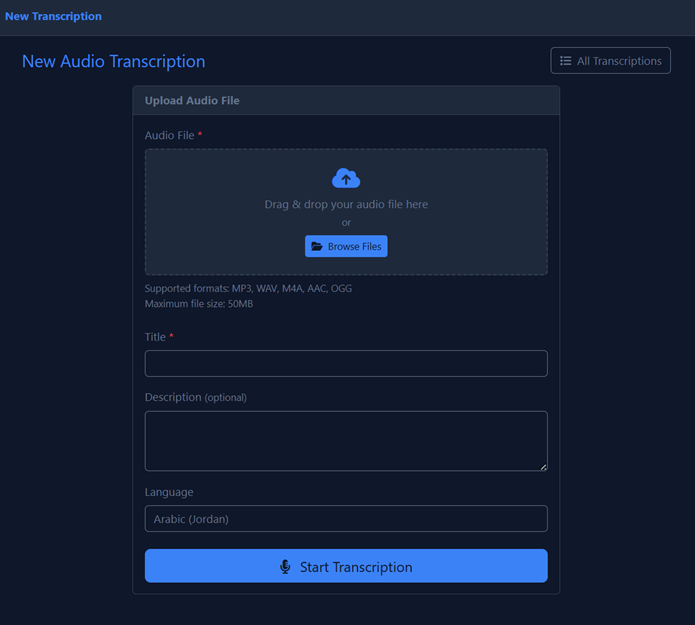
Navigate to Transcription:
Go to New Audio Transcription in the navigation menu.
-
Upload File:
Drag & drop your audio file into the upload area.
Supported Formats MP3, WAV, M4A, AAC, OGG Max Size 50 MB -
Title:
Enter a title for your transcription project.
-
Select Language:
Choose the exact language and dialect of the speaker.
Dialect SelectionFor best accuracy, select the specific dialect. For example, choose "Arabic (Jordan)" for Jordanian speakers rather than just "Arabic".
-
Start:
Click Start Transcription to begin processing.
For best results, use audio with clear speech and minimal background noise. The cleaner your source audio, the more accurate your transcription will be.